Inhaltsverzeichnis
User-defined functions
In REX/PSI Next Generation, you have the option of creating user-defined functions to customise specific calculations and simulations to your requirements. These functions make it possible to formulate complex mathematical expressions and conditions in order to calculate or adjust specific parameters in the simulation. To create these functions, we have developed our own minimal programming language that supports mathematical and logical expressions. This section explains the functionality, syntax and application of the user-defined functions in detail.
Overview: Manage user-defined functions
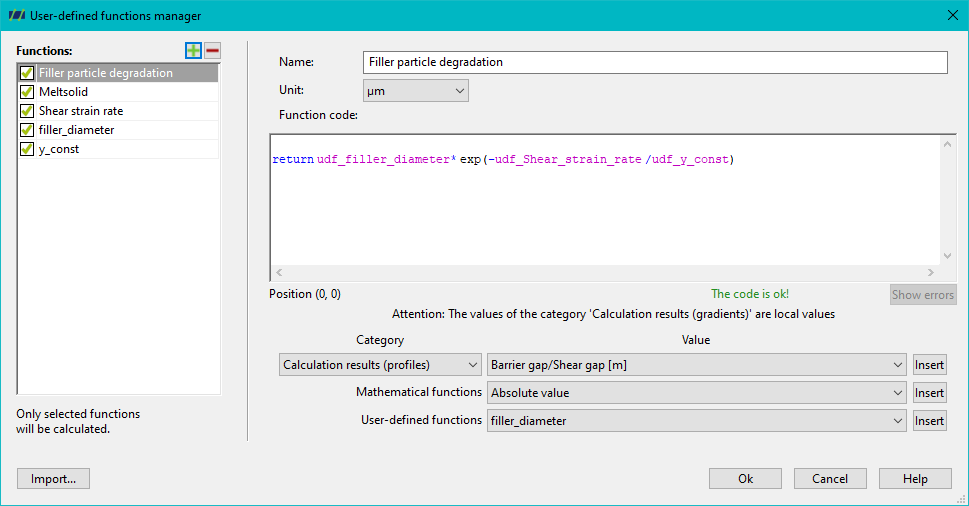
The Manage user-defined functions dialogue provides a central interface for creating and managing user-defined functions. This dialogue is divided into several sections:
- Upper section: This is where you define the name and unit of the user-defined function. The name is used to identify the function, while the unit describes the physical quantity that the function calculates. Important: Once the name of a function has been defined, it can no longer be changed.
- Middle area: You define the function yourself in a large text field. The text in this field is highlighted in colour (syntax highlighting) to increase clarity. Different elements such as keywords, variables or operators are displayed in different colours to make it easier to identify errors and make the code easier to read.
- Bottom area: Here you have access to a list of predefined variables and mathematical functions. With a simple click, you can insert these into the text field at the position of the cursor. As there are a total of 144 predefined variables containing calculation results or geometry data, this function makes it much easier to create complex functions.
- Left area: In the left-hand section of the dialogue, you can manage your user-defined functions. You can create or delete functions here.
Check and evaluate the function
Once you have defined your function, you can click on ‘OK’ to check whether the function has been formulated correctly. The software performs a syntactic check and if there are any errors, these are highlighted in colour in the text field. This helps you to quickly identify and correct sources of error.
Mathematical expressions
User-defined functions usually consist of mathematical expressions that represent a value. You can use variables, operators and mathematical functions in these expressions. The most important elements that can be used in a mathematical expression include
- ** Binary operators:** The basic arithmetic operations available in user-defined functions are:
- Exponentiation (^)
- Multiply (*)
- Divide (/)
- Adding (+)
- Subtract (-)
- Unary operators: The only defined unary operator is the minus (-), which is used to represent negative values.
- Brackets: You can bracket mathematical expressions in any order to control the order of calculations.
- Variables: You can use both predefined variables and your own variables in the expressions. Predefined variables provide important information such as geometry or material data. However, you can also define new variables that are then used in the function.
- Predefined functions: There are 13 basic mathematical functions available, such as the sine function or the logarithm.
- User-defined functions: User-defined functions that have already been created can be reused in other functions.
Calculation rules for mathematical expressions
- Precedence of operators: The arithmetic signs * and / have a higher priority than + and -. Powers are calculated first, and predefined functions bind more strongly than the power operator. Expressions in brackets are always calculated first.
- Associativity: All binary operators are left-associative, i.e. if several operators have the same priority, the expression is evaluated from left to right.
Logical expressions
Logical expressions represent a truth value and can be formulated using comparison operators and logical operators:
- Comparison operators:
- Less than ( < )
- Less than or equal to ( < = )
- Equal ( == )
- Greater-or-equal ( > = )
- Greater than ( > )
- Unequal ( != )
- Logical operators:
- and: Combines two logical expressions, both of which must be true.
- or: Combines two logical expressions, at least one of which must be true.
Logical expressions are often used for conditional statements to make the execution of commands dependent on a certain condition.
Anweisungen
In user-defined functions, there are different types of statements that start on a new line and control the result of a mathematical or logical expression:
- Assignments: An assignment binds the value of a mathematical expression to a variable:
<variable> = <mathematical expression>
- ** Return:** The return statement ends the function and returns the result of the mathematical expression:
return <mathematical expression>
- Conditional execution (if-then-else): An if-then-else statement performs a conditional check. If the logical expression is true, the then statement is executed, otherwise the else statement is executed. The else part is optional.
How to deal with invalid values
If an operation is not defined (e.g. division by zero), the special value invalid is returned. This invalid value can also be used as the result of a function, in which case no value is displayed for this interpolation point.