Inhaltsverzeichnis
Define process parameters
In REX/PSI Next Generation, the process parameters are defined centrally via the menu Simulation > Process parameters. These settings are crucial for the precise calculation of the processes, as they have a direct influence on the quality of the simulation. The following section describes the input options for the process-relevant parameters.
Structure of the dialogue
The dialog for the process parameters is divided into tabs, each containing different categories of input values.
- Required parameters: These values must be specified by the user as they are essential for the calculation.
- Optional parameters: These values can be specified by the user, but are not mandatory. If these values are not entered, they are calculated automatically by the software. An example of this are parameters such as the location of the melt pool formation (OSW).
- PSI only: Inputs for cycle time calculation
- PSI only: Inputs for calculating the closing time of the non-return valve
This subdivision allows the user to control necessary process parameters manually, while less critical values can be determined automatically by the software, which increases user-friendliness.
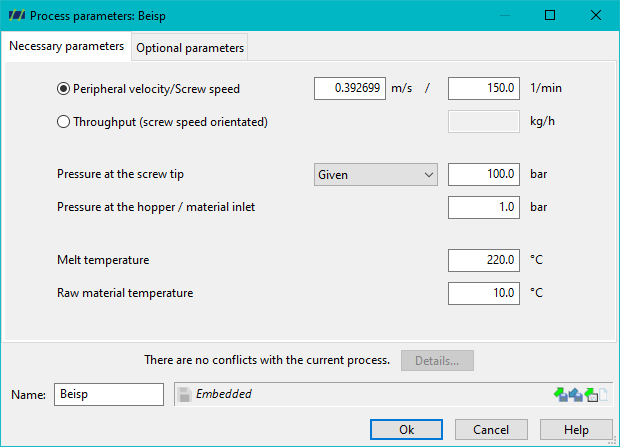
Necessary inputs
Necessary entries in PSI
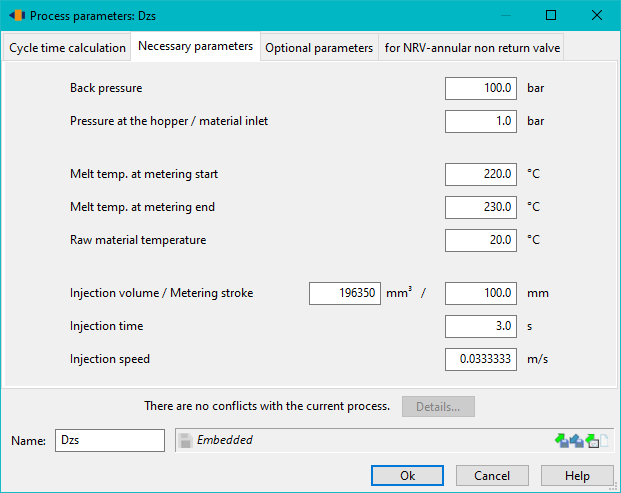
The necessary entries in PSI differ from the entries in REX:
- The specification of the screew speed and mass flow rate is taken over by the cycle time calculation
- The mass temperature must be specified at the start and end of dosing. If only one temperature is known, the same value can be used for both entries.
- Injection volume/metering stroke, injection time and injection speed are also required.
Calculation mode: Peripheral speed or throughput
First of all, the dialogue offers a choice between two calculation modes:
- Peripheral velocity: The Peripheral velocity or the screw speed is specified. The mass throughput is calculated as a function of this.
- Throughput: Alternatively, the desired mass throughput can be specified. In this case, the speed at which the specified throughput is achieved is calculated.
Note: With the optional parameters, a mass throughput can be specified in addition to the peripheral velocity/screw speed.
Pressure at the screw tip
A key function of the dialogue concerns the pressure input at the screw tip, which can be controlled in various ways depending on the process requirements. The user has three options to choose from:
- Given: (PSI: Back pressure) If Given is activated, the user specifies a fixed back pressure that is used as a constant input for the simulation process. This option is suitable for standard processes in which a fixed pressure is assumed at the screw tip.
- Die: Here, the calculation can be carried out using a defined die. This method uses specific tool data to determine the pressure curve in the simulation process.
- Die characteristic: This option activates the calculation of the pressure based on a die characteristic. The die characteristic represents a mathematical description of the pressure as a function of throughput and extrusion velocity, which enables precise simulation of the pressure build-up in specific tools. This method is particularly suitable for complex tools and variable process conditions.
Note: The selection of the options Die and Die characteristic is only available in REX.
Pressure at the hopper / material inlet
In addition to the pressure at the screw tip, the pressure at the hopper must also be specified. This is normally 1 bar and therefore ambient pressure. However, higher pressures can also be specified; this is particularly relevant for melt extruders. The pressure at the hopper may be higher than the pressure at the screw tip.
Melt temperature
The input of the melt temperature represents the melt temperature at the screw tip. The input is necessary so that an initial temperature profile is available for the throughput calculation.
The entered melt temperature therefore has an influence on the throughput calculation. However, the mass temperature can be iterated as part of the calculation_settings. In this case, the input is required as an initial estimated value, but has no influence on the calculated throughput.
The value therefore has an influence on the throughput calculation, but not on the temperature calculation. The temperature at the screw tip is calculated depending on the calculated throughput and does not correspond to the entered value.
Raw material temperature
The raw material temperature corresponds to the temperature at which the plastic is fed into the extruder/injection moulding machine. The temperature normally corresponds to the room temperature or the outlet temperature from a pellet dryer.
If a temperature above the melting temperature ($T_K/T_G$) is entered, the system is regarded as a melt extruder and no melting and melting calculation takes place.
Optional entries
The following entries are optional. If the fields are empty, all values are calculated as usual. If values are specified, these are used for the calculation.
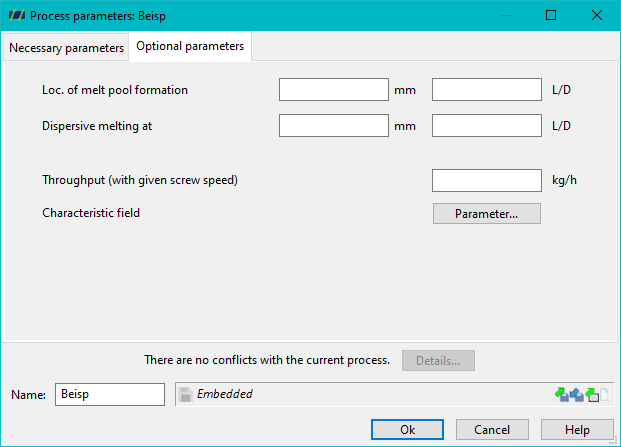
Location of the melt pool formation
The location of melt pool formation can be specified and is assigned to the start of the next calculation interval following the defined location. In this case, the melting and temperature calculations begin from the corresponding interval.
Disperse melting at
REX can calculate the melting in the conventional way (Maddok model) or using a disperse melting model. Dispersive melting always starts with shear and mixing elements as well as wave zones. The change from the conventional melting model to the disperse melting model can be set to an earlier point using the optional input made possible here.
Start Temperatur
As an additional optional input parameter, the starting temperature can be specified. This temperature corresponds to the temperature of the melt vertex at the location where the melt vertex is formed and represents the temperature at which the Temperature calculation begins.
Throughput (with given screw speed)
If a peripheral velocity or a screw speed is specified, a throughput can also be specified here as an option. This skips the throughput calculation and the entered value is used.
Characteristic field
Clicking on the ‘Characteristic field’ button opens a new window.
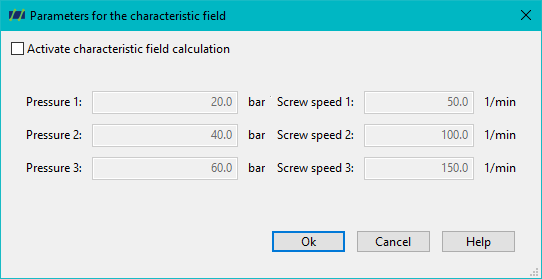
The characteristic field calculation can be activated here. Three pressures and three speeds are entered. In a process calculation, the throughput is calculated for each combination of pressures and speeds (thus for 9 operating points) so that the influence of speed and back pressure can be displayed in a diagram (see Graphical representation of the characteristic_curve_field).
Cycle time calculation (PSI)
The cycle time calculation is treated separately
Inputs for calculating the closing time of the non-return valve
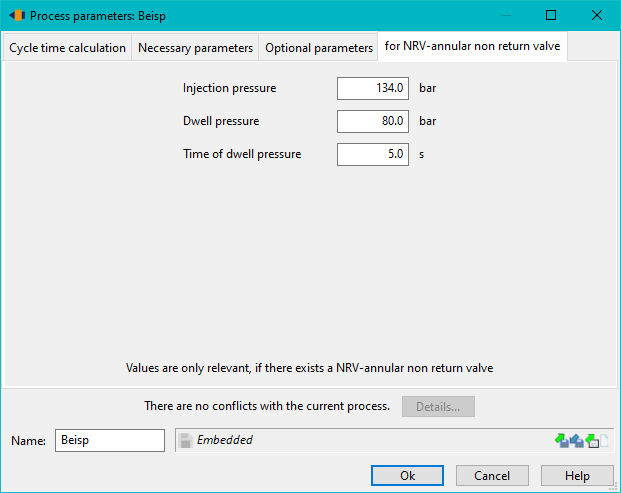
The 3 inputs are only used to calculate the closing time of the non-return valve.
- The injection pressure must be specified. The injection pressure is one of the forces that presses the closing ring against the pressure ring. A nozzle and die is also required as a counterpart to the injection pressure.
- Holding pressure
- Holding pressure time
The holding pressure and holding pressure time are not absolutely necessary. They are only required if the locking ring of the ring non-return valve closes after the injection phase and therefore within the holding pressure phase. This is not a sensible operating point.