General
In the Options section under General Settings, you have various configuration options available for your REX / PSI. For example, you can choose between German and English as the language.
Additionally, you can adjust the measurement units according to your preferences: Work in the metric system with millimeters or meters, or switch to the imperial system. For pressure units, you have the choice between Pascal, Bar, or PSI. The X-axis scaling can also be adjusted by selecting the length-to-diameter (L/D) ratio.
For CSV export, you can set the delimiter automatically or manually define it. In a German language setting, the delimiter is set to ; by default, while in an English setting, it is , – both options can be customized individually. The decimal separator can also be automatically set based on the language or manually defined.
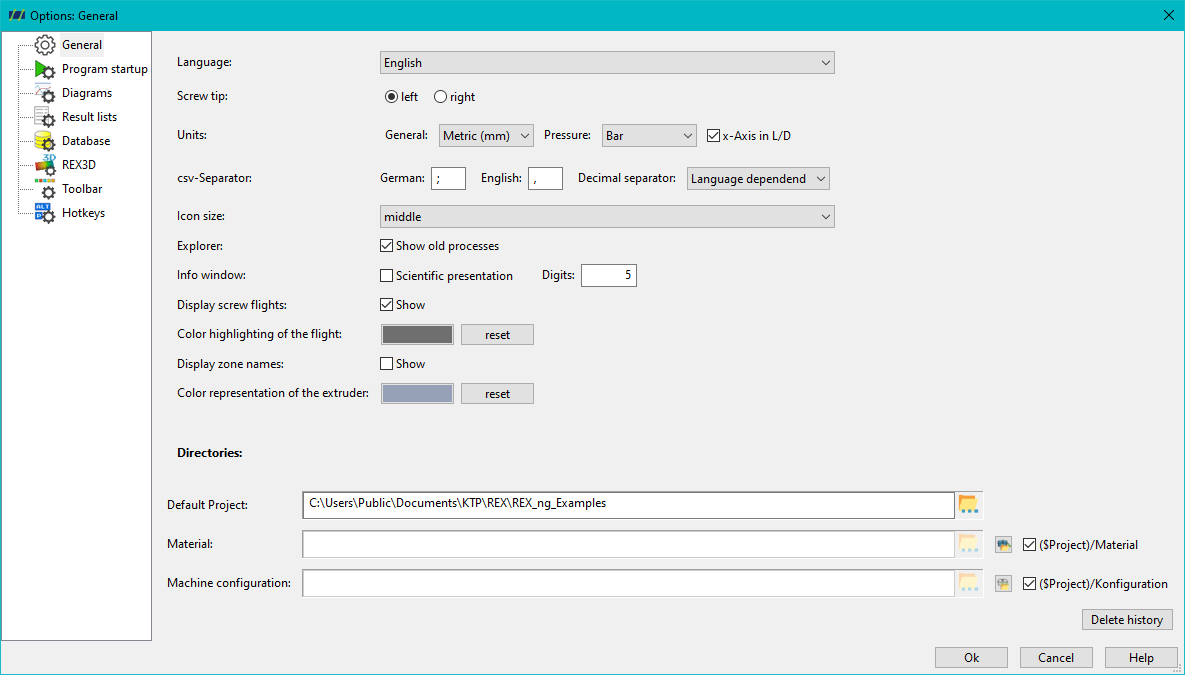
Given the variety of monitor sizes and resolutions, REX / PSI offers the option to adjust the size of the symbols in the settings. You can choose between small, medium, and large. In the Explorer bar, you can also decide whether to display or hide older REX Classic processes.
In the info window, you can set the number of decimal places displayed and have the option to visualize results in scientific notation.
In the REX / PSI calculation settings, you can choose whether all calculable models are selected by default or if only a single calculation is displayed as standard.
For the visualization of screws and their ridges, you can choose to show the ridges, highlight them in color, and toggle the display of zone names. The coloring of the machine can also be configured here. The Reset button allows you to revert the color scheme of the screw drawing to its original state.
Additionally, you can set a default project path for directories in REX / PSI, as well as specify folders for materials or screws.