Dies ist eine alte Version des Dokuments!
Apply processes and materials from Classic
Batch Import / Import multiple processes
If you have a large number of older processes and want to convert them to the new REX/PSI Next Generation format, you can use an automated method that makes this process much easier. With the batch import, several processes can be imported and converted at the same time without having to open each process individually and convert them manually. The batch import process is described in detail below.
Start of the batch import
To import several processes and convert them to the new format, proceed as follows:
- Navigate in the menu to Project > Import multiple processes. This will open a dialogue that will guide you through the import process.
Selecting the source directory
In the first step of the import dialogue, you will be asked to select a source directory. This directory contains the old process files that you want to import and convert. You can also include subdirectories in order to process a larger number of files efficiently.
Process conversion dialogue and selection of the target directory
As soon as the source directory is selected, the convert process dialogue opens. In this dialogue, you must define a target directory in which the converted files will be stored. The structure of the source directories can optionally be retained in order to maintain clarity.
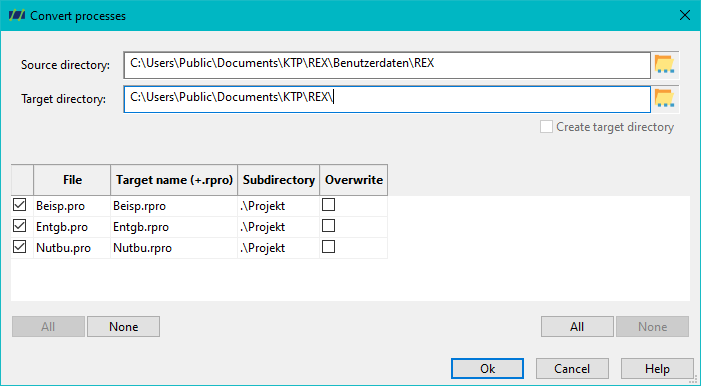
Overview of the files to be converted
After selecting the source and target directories, the system displays a list of all files in the old format that are located in the source directory and the subdirectories. This list gives you the option of:
- Specify a new destination name for each file.
- If necessary, adjust the subdirectory in which the converted file is to be saved.
This offers a high degree of flexibility to define individual file names and directory structures for the converted processes.
Starting the import process
Once you have made all the settings, start the import process by clicking on the OK button. The software will now start converting all selected processes into the new REX/PSI Next Generation format.
Warning messages and log file
As REX and PSI have received numerous new functions over the last 35 years, it is possible that older processes do not contain all the necessary simulation data required for the newer versions. In these cases, warning messages are generated during the import process. These warning messages indicate which data or parameters are missing or need to be adjusted.
All warning messages are saved in a log file, which is made available to you once the import process is complete. This log file allows you to check the imported processes for any problems and adjust them manually if necessary.
Screws, barrels, hoppers, moulds and materials
The process can be carried out in the same way for individual process components such as screws, barrels, hoppers, moulds and materials. The corresponding menu items can be found in the configuration or material menu.