Dies ist eine alte Version des Dokuments!
Searching processes
In environments with a large number of REX/PSI simulation processes, as is often the case in the field of mechanical engineering and plastics technology, finding specific project processes quickly can be crucial to the efficiency of your work. REX/PSI Next Generation offers the Search process function for this purpose, which makes it possible to search for specific process parameters and properties.
Access to the search function
To use the search function, you can either:
- Navigate via the menu Project > Search process or
- Use the hotkey Ctrl + F to quickly open the search function.
This opens a dialogue window in which you can define various search criteria to search your processes specifically.
Select search directory
Before you start the search, you must specify the search directory in which the simulation processes are to be searched. The current project directory is preset by default. However, you have the option of customising this directory to search for processes in other folders or directories.
Specifying the search criteria
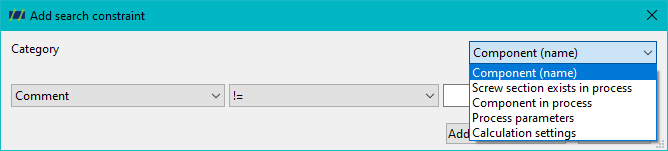
In the dialogue window for the process search, you can define a variety of search criteria that can be tailored to the specific requirements of your project. The search criteria can be divided into several areas:
Search for component names, comments and editor:
Here you have the option to search for processes by component names (barrel, screw, die, hopper, material), as well as by calculation settings, process parameters, Editor, and comments.
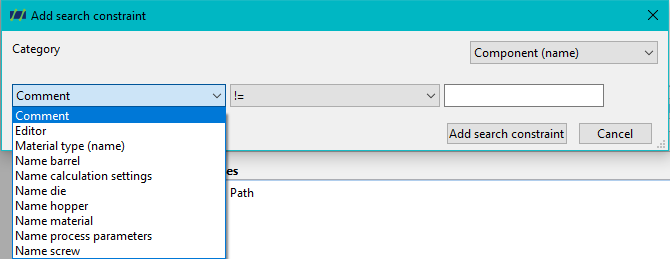
Specific snail zones:
Another important search area is the targeted search for specific screw zones. For example, you can search for whether a process contains a specific Maddock shear part component or filter for other specific screw configurations.
Geometric properties:
In addition to the general components, you have the option of searching for geometric properties, such as the diameter, that are relevant for your simulation. This allows you to specifically identify processes that have certain geometric characteristics.
Process parameters:
Another function is the search for process parameters. You can search processes based on specific simulation parameters, such as the pressure at the screw tip, the raw material inlet temperature or the speed.
This function is particularly useful if you want to compare or optimise processes that adhere to specific process parameters.
Calculation settings:
You can also define search criteria based on simulation calculation settings. This allows you to search specifically for processes that were carried out with certain calculation settings.
Logic of the search criteria
Once you have defined the desired search criteria, you can specify how these criteria should be applied:
- All criteria must be fulfilled: The search algorithm only lists processes that fulfil all defined criteria.
- At least one criterion must be fulfilled: Alternatively, you can also set that processes are already displayed that fulfil at least one of the defined search criteria. This option is helpful if you want to search through a large number of processes and remain flexible.
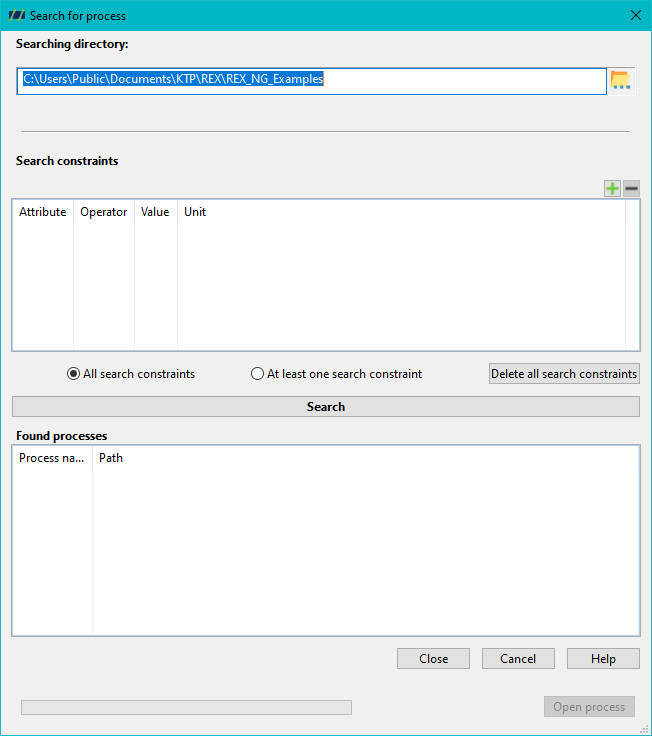
Start the process search
As soon as you have defined all the search criteria, start the search by clicking on the Start search button. The algorithm then begins to scan the defined search directory for processes that match the criteria you have defined. This process allows you to quickly and precisely identify relevant simulation processes.
Results and selection
Once the search is complete, all processes that match the search criteria are displayed in a list. This list contains the relevant information on the processes found so that you can quickly recognise which processes are of interest for your further work.
You now have the option of selecting the processes found and loading them into your project. This significantly increases efficiency when dealing with large amounts of data and simulation processes, as you can access the information you need without having to search manually for a long time. Summary
The process search function in PSI / REX Next Generation is a powerful tool that allows you to search for processes based on specific properties, geometries, process parameters and calculation settings. With the flexibility to define search criteria and the ability to combine them logically, the function provides an efficient way to quickly and accurately find the relevant simulation processes in extensive project directories.